 Team-Trak
How to Manage a Mobile Workforce Without Adding More Admin
 By Bob Fitzjohn8 min read
Learn how to manage a mobile workforce with clear schedules, fair visit checks and reliable records to simplify timesheets, reduce disputes and cut admin.

In this article
A client calls to say no one arrived. Your team member says they were there. You believe them, but the schedule is in one tool, updates are in WhatsApp, and the timesheet still needs piecing together. If you’re working out how to manage a mobile workforce, the answer isn’t to ask staff for more updates or add another layer of reporting. It’s to connect each scheduled job to a clear, reliable visit record.
You already know field work changes during the day. But when records are scattered, even a routine visit can mean more follow-up, and a disputed one can put trust under strain. This article lays out a practical process for scheduling jobs, confirming arrival and departure fairly, reviewing exceptions and turning accurate visit records into timesheets. You’ll see which habits help first and how to reduce admin while respecting your team.
Key Takeaways
- Learn how to manage a mobile workforce by linking each scheduled job to clear arrival expectations and a usable visit record.
- Set fair accountability rules so staff know what to do when a visit changes or a check-in needs attention.
- Choose between paper, spreadsheets, messages and software based on how much coordination and record-keeping your team needs.
- See how reliable visit records can make timesheets easier to prepare and support more accurate client invoicing.
Table of Contents
How to manage a mobile workforce when jobs happen at client sites
A client says the cleaner never arrived. Your team member remembers unlocking the door and getting started. Without a reliable visit record, you’re left piecing together the schedule, messages and recollections to work out what happened.
How to manage a mobile workforce starts with a simple operating process: coordinate scheduled jobs, make responsibilities clear, record check-ins reliably and keep information in a form you can use. The aim isn’t to add updates for their own sake. It’s to make the job and its outcome clear to the people doing the work and the person managing it.
When the schedule lives in one place, changes in messages and hours on handwritten timesheets, nobody has the full picture. A moved appointment may not reach the right person; a timesheet written up later may leave arrival and finish times uncertain. That uncertainty creates repeat calls and manual checking. The wider idea of field service management covers coordinating work away from company premises, but small teams need a process that works in the middle of a busy day.
What good mobile workforce management looks like in practice
Give every job one source of truth: who’s going, where they need to be, when they’re expected and what counts as completion. For a cleaning visit, that might mean assigning the team member, recording the property and start time, and noting the agreed tasks. Keep changes attached to the job rather than relying on someone to find an old message.
Most scheduled visits go to plan. The time often disappears into finding the few that didn’t, then checking texts, asking staff and rebuilding timesheets. A clear schedule makes exceptions easier to spot and resolve. For a practical approach to assigning jobs and handling changes, use this workforce management scheduling guide.
How to manage a mobile workforce with clear, fair accountability
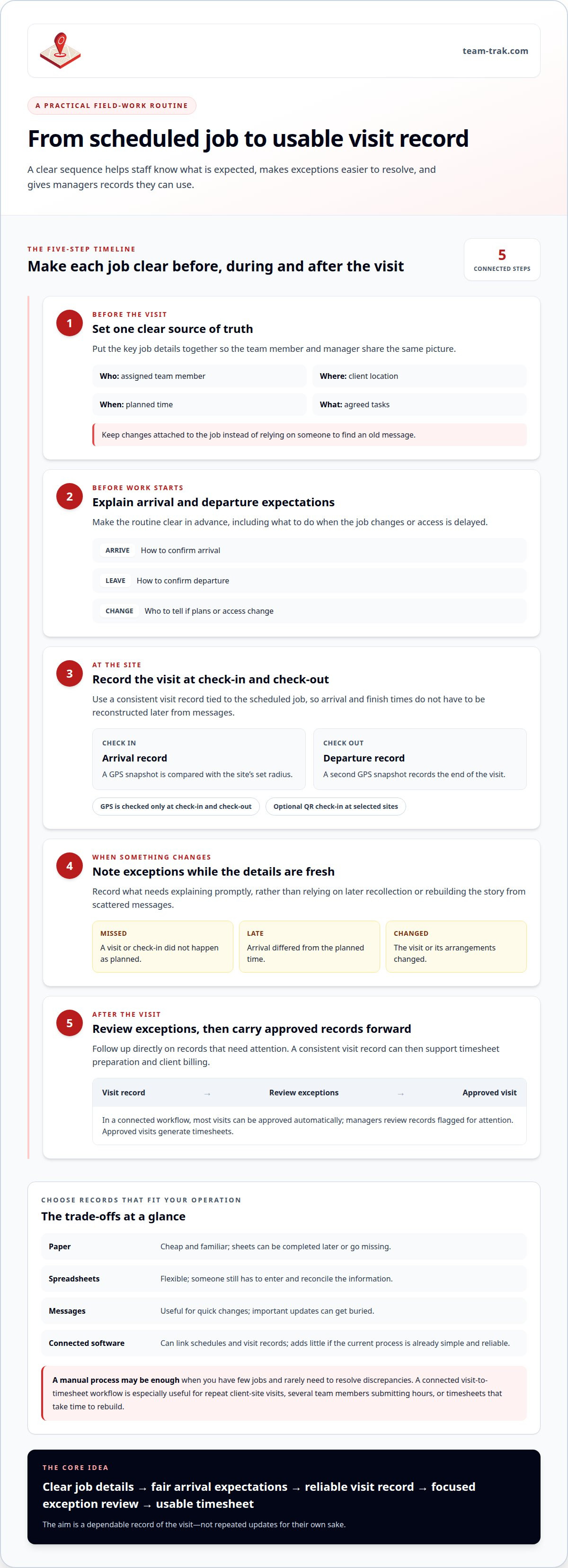
Good accountability makes the expected process clear before a job starts, then gives you a consistent way to handle exceptions. Use a simple routine:
- Set the schedule. Confirm the assigned team member, location and planned time, and make changes visible to everyone affected.
- Define arrival expectations. Tell staff how to confirm arrival and departure, and what to do if access is delayed or the job changes.
- Record exceptions. Note missed, late or changed visits promptly, while details are fresh.
- Review what needs attention. Check flagged records and follow up directly, rather than asking everyone to report repeatedly.
Choose records that fit your operation. Paper is cheap and familiar, but sheets can be completed later or go missing. Spreadsheets are flexible, though someone still has to enter and reconcile the information. Messages are useful for quick changes, but important updates can get buried. Software can connect schedules and visit records, but adds little if your current process is simple, reliable and easy to maintain. If you have few jobs and rarely need to resolve discrepancies, a shared rota and a consistent manual log may be enough.
Build accountability without continuous location tracking
Fair verification is about confirming a visit, not following someone throughout the day. A GPS snapshot at check-in and another at check-out can help staff show they attended, without continuous location tracking. QR check-ins are optional and can be used at selected sites. Explain what gets recorded and how exceptions are handled; clear expectations protect honest team members from having to rely on memory alone.
For a fuller explanation of what a location check can and can’t establish, see this GPS-verified attendance guide. A results-focused approach also aligns with Harvard Business Review’s advice on managing remote workers without micromanagement: agree what good work looks like, then communicate when something needs attention.
If you want to see how visit verification fits into a practical field-work process, explore Team-Trak.
Turn mobile workforce visits into records your business can use
A visit record is most useful when it carries through to the next task. If arrival and departure times sit in messages while hours are typed into a timesheet later, managers still have to reconcile the two. A consistent record tied to the scheduled job can reduce that reconstruction and give you clearer information when preparing client invoices.
Reliable records also make it easier to check that hours reflect the work completed. For businesses operating in the United States, the Department of Labor explains FLSA recordkeeping requirements; requirements differ by jurisdiction, so follow the rules that apply to your business.
When a connected visit-to-timesheet workflow is useful
This approach is especially useful when you manage repeat visits across client sites, have several team members submitting hours, or spend time rebuilding timesheets at the end of a pay period. If your current records are already complete and easy to reconcile, a manual process may still suit you.
For teams that need a connected process, Team-Trak links scheduled jobs to check-in and check-out records. Each check-in and check-out captures a GPS snapshot against the site’s set radius, not continuous location data. Optional QR check-ins can be used at selected sites. Most visits can be approved automatically, leaving managers to review records flagged for attention; approved visits generate timesheets. Temporary workers can check in through a browser link without an app or login.
That gives managers a clearer route from attendance records to payroll workflows and client billing, while cutting down on manual re-entry. You can learn more about automated timesheets and decide whether linking visits to hours would simplify your process.
If you’d like to see how scheduled work and visit records fit together, take a look at Team-Trak.
Make the next step a small one
The next step in how to manage a mobile workforce is to identify where your current process creates the most follow-up. Is it confirming visits, resolving exceptions or preparing hours? Start there. A focused change is easier to explain to your team and easier to judge than replacing every tool at once.
If you want to try a connected process, Team-Trak setup takes under 10 minutes and requires no special hardware. You can test it with a practice check-in before deciding whether it suits your operation.
Choose a process that gives staff clarity and gives you records you can act on. Less time rebuilding the day means more room to run the business.
Frequently Asked Questions
How do you manage a mobile workforce without micromanaging staff?
To manage a mobile workforce without micromanaging, agree what a completed job looks like and how staff should raise problems, then judge the work against those expectations. For example, define which tasks must be finished and who to contact if a client changes the request. This gives team members room to work independently and gives managers a clear basis for follow-up.
Can temporary workers check in without downloading a workforce app?
Yes, temporary workers can check in through a browser link without downloading an app or creating a login. To keep the process straightforward, send the link with the assignment details before the shift and make sure the worker knows which job it relates to. That can prevent confusion when someone is covering a single visit or joining at short notice.
Do mobile workforce teams need QR codes at every job site?
No. A QR code at every location isn’t necessary. Decide site by site whether an extra on-site confirmation would solve a real problem, such as uncertainty about which entrance a team member should use. If the usual check-in process already gives you a clear record, adding another step may create effort without improving the information you need.
What information does GPS check-in record for a service visit?
A GPS check-in records a location snapshot at the moment of check-in, with another at check-out. These points can help establish whether a visit began and ended near its assigned site, but they don’t show what tasks were completed or explain a delay. Keep task completion notes and relevant changes with the job record when that context matters.
Disclaimer
The information provided in this article is for general informational purposes only and reflects the opinions and experiences of the author. While every effort has been made to ensure accuracy, Team Trak makes no guarantees regarding completeness
Written by
Bob Fitzjohn
Founder of Team-Trak and serial entrepreneur with over 50 years’ experience building and scaling service businesses. Bob writes about workforce management, operational efficiency, automation, and the realities of running small businesses in today’s environment.


