 Team-Trak
Electrical Contractor Field Operations Software: What to Choose
 By Bob Fitzjohn8 min read
Compare electrical contractor field operations software by scheduling, site evidence, timesheets and billing. Find a fit for service calls and projects.

In this article
A site visit is over, but the record of who arrived, when they left and what hours to bill is split between a call, a message and a spreadsheet. Electrical contractor field operations software should bring those records together, not create another place to chase updates. For a small team balancing call-outs with longer projects, a broad platform can bring more tools than you need.
Choose software by starting with the records your team needs: a usable schedule, clear evidence of attendance and hours that can be reviewed for payroll and client billing. This guide compares practical options, from spreadsheets and basic time clocks to field-service suites, and explains what each handles well and where extra admin can creep in. You’ll finish with a way to match software to your mix of service calls and project work.
Key Takeaways
- Match the workflow to the work: recurring service calls and multi-stage projects may need different tools.
- Compare electrical contractor field operations software by scheduling, site evidence, time records, billing flow and setup effort.
- Look for a process that turns scheduled visits into reviewed records and usable timesheets without adding unnecessary admin.
- Check how location records are captured and whether QR check-ins are optional for selected sites.
Table of Contents
What Electrical Contractor Field Operations Software Needs to Solve
By Friday afternoon, hours for a week of call-outs can be scattered across texts, diary notes and someone’s memory. If a client questions a visit, you may have to piece together who attended and when. The admin problem isn’t simply a lack of features. It’s the gap between work scheduled, work completed and the records used for pay or billing.
Start by identifying where that gap occurs. Electrical contractor field operations software should address the work your team repeats or struggles to document, not add tools just because they’re available. Scheduling helps organise who goes where; checklists can clarify what needs doing; attendance records support visit verification; and timesheets make hours easier to review. Project cost controls serve a separate purpose: managing planned work against budgets.
Match the software to service calls, projects, or both
A small service crew handling maintenance visits and call-outs may prioritise a clear schedule and reliable records of arrival, departure and time worked. A short visit can still create a long client conversation if its details are missing when a query comes in. This overview of field service management systems explains how scheduling and field activity connect with back-office administration.
Multi-stage construction projects bring different requirements. A schedule alone may not show dependencies, task ownership, progress against a plan or how labour and materials affect the budget. These teams may need project planning and cost controls alongside attendance records. If you handle both kinds of work, decide whether one system supports each workflow clearly or whether an attendance tool should sit alongside project software.
- Jobs move or overlap: prioritise scheduling that makes changes easy to see.
- Work steps are missed: consider task lists or checklists for the steps your team needs to record.
- Visits or hours are disputed: look for attendance evidence and timesheets that can be reviewed.
- Project budgets need oversight: prioritise cost control and progress planning.
How to Compare Electrical Contractor Software Without Adding Admin
Compare tools by the records they create, not the number of features on the menu. Most visits go to plan. Admin tends to build up around exceptions: a missed check-in, a changed job time or an hour total that doesn’t match the client’s record. A useful system makes those exceptions easier to resolve without adding steps to every routine visit.
| Option | Scheduling and site evidence | Time records and billing | Effort and fit |
|---|---|---|---|
| Paper or spreadsheets | Manual updates; little reliable site evidence | Hours need entering and checking; billing stays separate | Easy to start, but admin grows as records and staff increase |
| Accounting tools | Usually not designed for scheduling or visit evidence | Useful for accounts and invoices, but depend on the hours entered | Good for finance when visit records are handled elsewhere |
| Project suites | Can support plans, tasks and coordination | May need another step to turn attendance into time and billing records | Better suited to teams needing broader project controls |
| Attendance-to-timesheet workflows | Can connect scheduled visits with arrival and departure records | Approved visit records can feed timesheets and onward billing | Fits teams prioritising dependable hours and less re-entry |
Field tasks may also need clear steps, particularly where work involves documented safety procedures. OSHA’s safety and compliance standards for electrical contractors are a US-specific reference. Use the guidance that applies to your own operating context.
Use a buying checklist based on the records you need
Before choosing electrical contractor field operations software, trace a typical visit from schedule to invoice. Can the system record arrival and departure? Can a manager review exceptions and approve a visit before it becomes a timesheet? This guide to automated timesheets explains how verified visit records can feed into time records.
- Confirm whether approved hours can flow into your payroll process or online accounting systems without duplicate entry.
- Test a changed visit as well as a routine one. Check how the schedule and record are updated, and what the manager needs to review.
If verified visits and timesheets are the gap you need to close, compare a scheduling and attendance workflow with the other options.
When Team-Trak Fits an Electrical Contractor's Field Workflow
Team-Trak handles scheduling, attendance verification and timesheets for electrical contractors whose staff work at client sites. It gives you a record of who attended a scheduled job and how long the visit lasted. It is focused on field attendance and records, so teams with complex construction planning can use it alongside project software for plans, tasks and budget controls.
Decide whether verified visits are the missing link
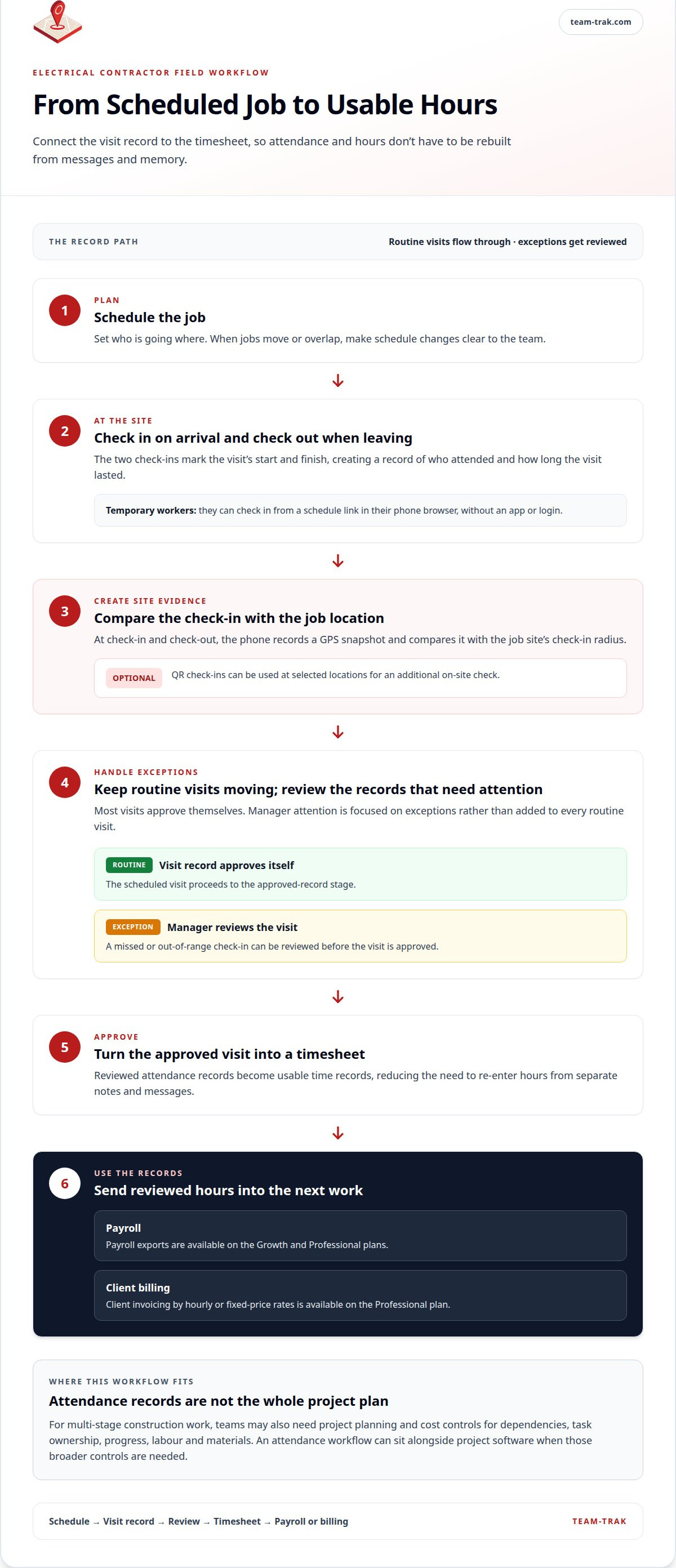
The workflow runs from schedule to check-in and check-out, then exception review and approval. At arrival and departure, the phone records a GPS snapshot and compares it with the job site’s check-in radius. QR check-ins are optional at selected locations. Most visits approve themselves; a missed or out-of-range check-in can be reviewed before an approved visit becomes a timesheet.
Temporary workers can check in through a schedule link in their browser, without an app or login. Managers use a web dashboard. This keeps attendance records connected to timesheets instead of leaving someone to rebuild the week from messages.
Payroll exports are available on the Growth and Professional plans. Client invoicing by hourly or fixed-price rates is available on the Professional plan. If you already use project software for plans, tasks and budget controls, Team-Trak’s attendance workflow can complement it without adding another full project suite.
When comparing electrical contractor field operations software, test whether the process gives your team useful visit records and makes exceptions straightforward to review. The practical measure is whether it improves the record of each visit without adding unnecessary steps to routine check-ins.
Make the Next Step a Practical One
Choose a typical workday and list what you’d want to find quickly if a client or team member raised a question. Use that as a practical test of whether electrical contractor field operations software will make the day easier to manage, rather than simply adding another system.
Keep the test focused on your team’s actual work. Run a routine call-out and a changed visit through the process, then check how easily you can find the schedule, attendance record and hours.
Start your 7-day free trial. No credit card needed, and your first practice check-in takes under a minute.
Frequently Asked Questions
Can electrical contractor software handle both service calls and larger projects?
It depends on what your team needs it to handle. A maintenance crew may need to assign visits and record attendance, while a larger fit-out may also need project plans, task dependencies and budget oversight. Map a typical call-out and a project phase before choosing one platform for both. If either workflow needs awkward workarounds, separate tools may be a better fit.
Does electrical contractor field operations software replace accounting software?
No. Field operations software can organise job visits and prepare records for billing, but accounting software remains responsible for your accounts. Look for a clear hand-off, such as payroll exports or an accounting integration, so approved hours don’t need to be entered again. For example, a completed service visit can provide the record for an invoice while the accounting tool records the transaction.
Can a small electrical contractor benefit from field operations software?
Yes, when managing schedules and visit hours is taking time away from running jobs. A small team with a manageable call-out diary may be fine with its existing tools. Software becomes more useful when staff work across sites and records are repeatedly chased or rebuilt. Start by identifying how often you correct timesheets or resolve attendance questions, then choose a workflow that addresses that friction.
How can contractors verify site attendance without continuous location tracking?
Use check-in and check-out records tied to scheduled jobs, rather than collecting a team member’s location throughout the day. Team-Trak takes GPS snapshots at arrival and departure. Optional QR check-ins add an on-site step at selected locations. Explain clearly to staff what the record captures so attendance verification is a transparent part of recording completed work.
Disclaimer
The information provided in this article is for general informational purposes only and reflects the opinions and experiences of the author. While every effort has been made to ensure accuracy, Team Trak makes no guarantees regarding completeness
Written by
Bob Fitzjohn
Founder of Team-Trak and serial entrepreneur with over 50 years’ experience building and scaling service businesses. Bob writes about workforce management, operational efficiency, automation, and the realities of running small businesses in today’s environment.


