
Remote Team Attendance Software: Choose the Right Fit
 By Bob Fitzjohn8 min read
Compare remote team attendance software for field and home staff. Learn how to verify client visits, cut timesheet admin, and turn hours into clean payroll.

In this article
- Key Takeaways
- Remote team attendance software: does your team work remotely or on-site?
- Compare remote team attendance software by proof, privacy, and admin
- How Team-Trak turns remote attendance into verified visits and timesheets
- Make your next attendance decision a practical one
- Frequently Asked Questions
The right attendance tool for a remote team depends on where the work happens. A cleaner moving between client properties needs a record of arrival and departure; a colleague working from home may need a way to record and approve hours. Treating both teams the same can leave service visits hard to verify and timesheets full of gaps.
If you’re piecing hours together from messages, paper sheets or late timesheet updates, you’re not alone. The challenge isn’t just recording time. It’s resolving disagreements about whether a visit happened and how long it lasted, without adding another round of admin. Clear records give staff and managers something concrete to refer to.
This guide compares manual methods, general-purpose tools and remote team attendance software for field teams. You’ll see what each approach can verify, how to choose a workable check-in process, and how verified visits can flow into timesheets and the administration that follows.
Key Takeaways
- Match the attendance method to where work happens: home-based teams and staff visiting client sites need different records.
- Compare remote team attendance software by the evidence it captures, the effort it asks of staff, and how easily managers can review hours.
- If you need to verify visits at client locations, choose a process that records arrival and departure without collecting location continuously.
- Look for a workflow that carries approved visit records into timesheets, so managers can focus on exceptions instead of rebuilding every shift.
Table of Contents
Remote team attendance software: does your team work remotely or on-site?
Attendance software records who worked and when. For a team based at home, that may be enough to support hours and approvals. For cleaners, tradespeople or care staff moving between scheduled client visits, the record may also need to show which job site they attended.
That distinction matters when choosing remote team attendance software. A tool built around desk-based work can record hours without showing whether a team member arrived at a client’s property. Field teams need a practical way to connect attendance to scheduled jobs, while accounting for the fact that staff travel between locations.
Most visits go as planned. The admin tends to gather around the exceptions: a missed check-in, a client query, or a visit duration that doesn’t match the timesheet. Clear records let managers focus on those cases instead of asking every team member to confirm routine visits. The wider category of time and attendance systems covers the basics of recording working time, but service businesses also need to consider job-site context.
What records does a remote service team actually need?
Keep four details distinct. Each answers a different question, and combining them into one vague “hours worked” figure can make a review harder:
- Attendance time: when the team member checked in and out.
- Visit location: which scheduled job site the record relates to.
- Job status: whether the visit was completed, missed or needs review.
- Payroll-ready hours: the time approved for timesheet processing.
Staff can refer to a clear record if a visit is questioned, and clients can see whether attendance and duration have been confirmed. For the wider routines that keep distributed work organised, see this practical guide to managing a remote service team.
Compare remote team attendance software by proof, privacy, and admin
Compare each approach against the work it needs to support. The best fit is the one that gives you a useful record without creating more effort than it removes.
| Approach | Job-site proof | Staff effort | Review and timesheet flow | Best fit |
|---|---|---|---|---|
| Paper sheets | Weak; entries can be filled in later | Low to start, but someone must collect them | Manual checking and adding | Small teams with simple, stable shifts |
| Spreadsheets | Doesn’t verify attendance | Manual updates | Flexible, but errors can carry into timesheets | Teams comfortable maintaining their own records |
| Messages | Unverified; details may be buried | Easy for quick updates | Managers piece together hours from messages | Informal updates, not a complete attendance record |
| Basic time clocks | Records time, but may not confirm location | Usually straightforward | Hours may still need review and transfer | Teams working from one regular site |
| Field attendance software | Can connect a check-in to a job site | Requires a consistent check-in routine | May link approved visits to timesheets | Teams moving between client locations |
Which attendance approach fits your team’s work pattern?
If staff work from home, set a clear process for recording and approving hours. The U.S. Department of Labor telework guidance discusses timekeeping for covered US employers. If your team is hybrid, make the same hours process work across home and office days. If staff visit client sites, consider whether job-linked attendance records would make reviews easier.
Collect only the information your process needs. Before choosing a tool, understand when location is captured and what the record is intended to verify. A useful check-in process should give managers enough detail to review an exception without asking staff to account for every movement between appointments.
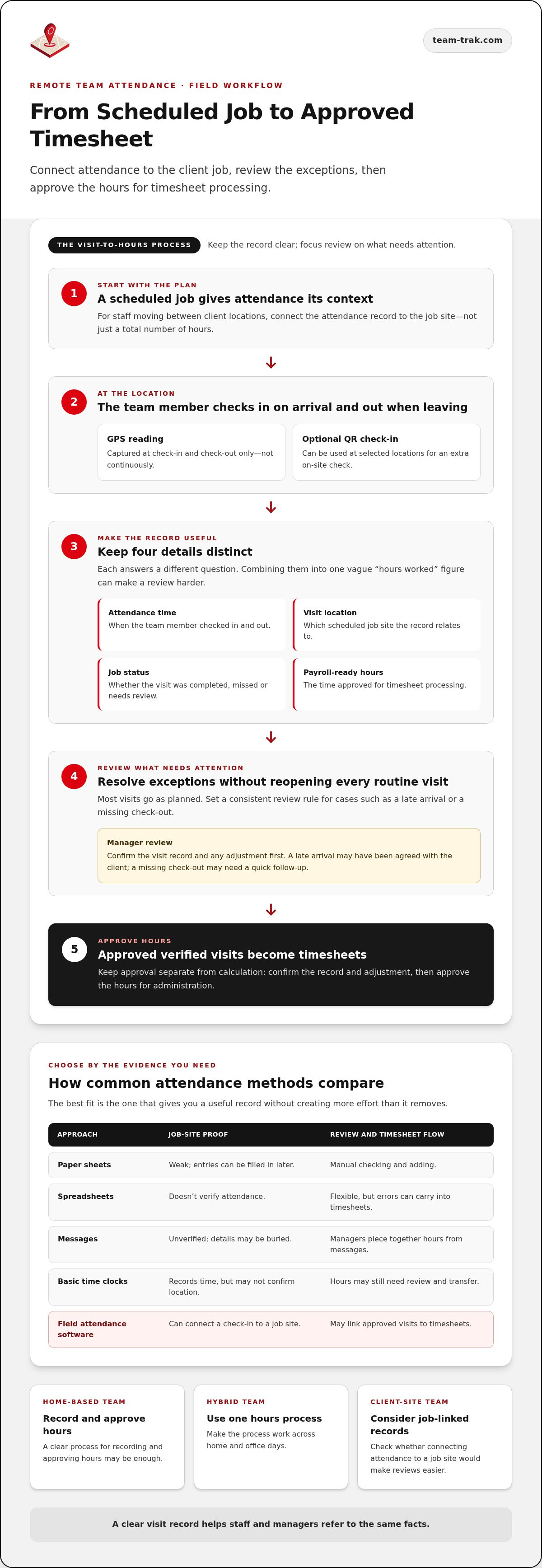
How Team-Trak turns remote attendance into verified visits and timesheets
Before choosing a workflow, decide what a manager should do when a visit record doesn’t match the plan. A late arrival may have been agreed with the client; a missing check-out may need a quick follow-up. Set a consistent review rule so staff know how to report changes and managers can resolve exceptions without reopening every routine visit.
Keep approval separate from calculation. First confirm the visit record and any adjustment, then approve the hours for the timesheet. That makes it clear which decisions belong to a manager and which figures are ready for administration.
What happens between a scheduled job and an approved timesheet?
Team-Trak connects scheduled jobs with staff check-ins and check-outs. It records GPS only at those two moments, not continuously. Optional QR check-ins can be used at selected locations. Records that need attention are flagged for review, while approved verified visits generate timesheets. Temporary workers and contractors can check in from a unique schedule link in a browser, without installing the app or logging in.
For a closer look at the hand-off from visit records to hours, this guide to automated timesheets explains practical ways to simplify the review process. If you’d like to try the workflow with your own schedule, start a 7-day free trial. No credit card is needed.
Make your next attendance decision a practical one
The right remote team attendance software gives your team a clear record without asking for more information than the work requires. Before changing your process, decide what a useful record must show and how managers will handle exceptions. That gives you a practical way to judge whether a new workflow will reduce follow-up or simply add another admin step.
For client-site teams, Team-Trak records GPS only at check-in and check-out, giving staff and managers a defined attendance record without continuous location collection. You can try the workflow during a 7-day free trial, with no credit card required. Start with a practice check-in and see whether the records suit your team’s day-to-day work. Start your 7-day free trial and take the next step towards clearer attendance records.
Frequently Asked Questions
Can remote attendance software work for teams visiting client sites?
Yes. Before adopting a system, map a typical working day: how many jobs staff visit, how often schedules change, and what happens when a client asks to move an appointment. A team with frequent changes may need an easy way to flag amended plans; a team with stable visits may manage well with a simpler routine. Choose a process that fits how the work actually runs.
Does attendance software need to record staff location all day?
No. Decide what question the location record needs to answer, then avoid collecting more information than that purpose requires. Confirming that a visit began at the intended property is different from recording someone’s movements between appointments. Team-Trak records GPS only at check-in and check-out. Be clear with staff about the purpose and boundaries of any location feature before introducing it.
Can temporary workers check in without installing an attendance app?
Some systems offer access without an app, which can be useful when a temporary worker is assigned at short notice or doesn’t use your usual staff tools. Team-Trak gives temporary workers and contractors a unique schedule link for browser check-in. Before a shift, make sure the worker has the correct job details and knows how to report a change.
How can attendance records help reduce payroll errors?
They give managers a consistent reference when checking submitted hours, especially when shifts cover multiple jobs. Set clear rules for breaks, schedule changes, rounding and hourly rates, then apply them consistently during review. Automated calculations still depend on accurate settings and good records, so check unusual entries before approving the pay period.
Disclaimer
The information provided in this article is for general informational purposes only and reflects the opinions and experiences of the author. While every effort has been made to ensure accuracy, Team Trak makes no guarantees regarding completeness
Written by
Bob Fitzjohn
Founder of Team-Trak and serial entrepreneur with over 50 years’ experience building and scaling service businesses. Bob writes about workforce management, operational efficiency, automation, and the realities of running small businesses in today’s environment.


